ios-tools
How to Choose an iPhone App Blocker Without a Subscription
Choose an iPhone app blocker by what it does on the device, what it needs from you, and how clearly it explains its limits.
Compare recurring billing with useful blocking
Start by ignoring the pricing headline and asking what the app actually does when you open a selected app. Does it provide a clear shield, an end time, a recurring schedule, and a way to review the active state? A simple workflow can be more valuable than a large list of modes that you cannot explain.
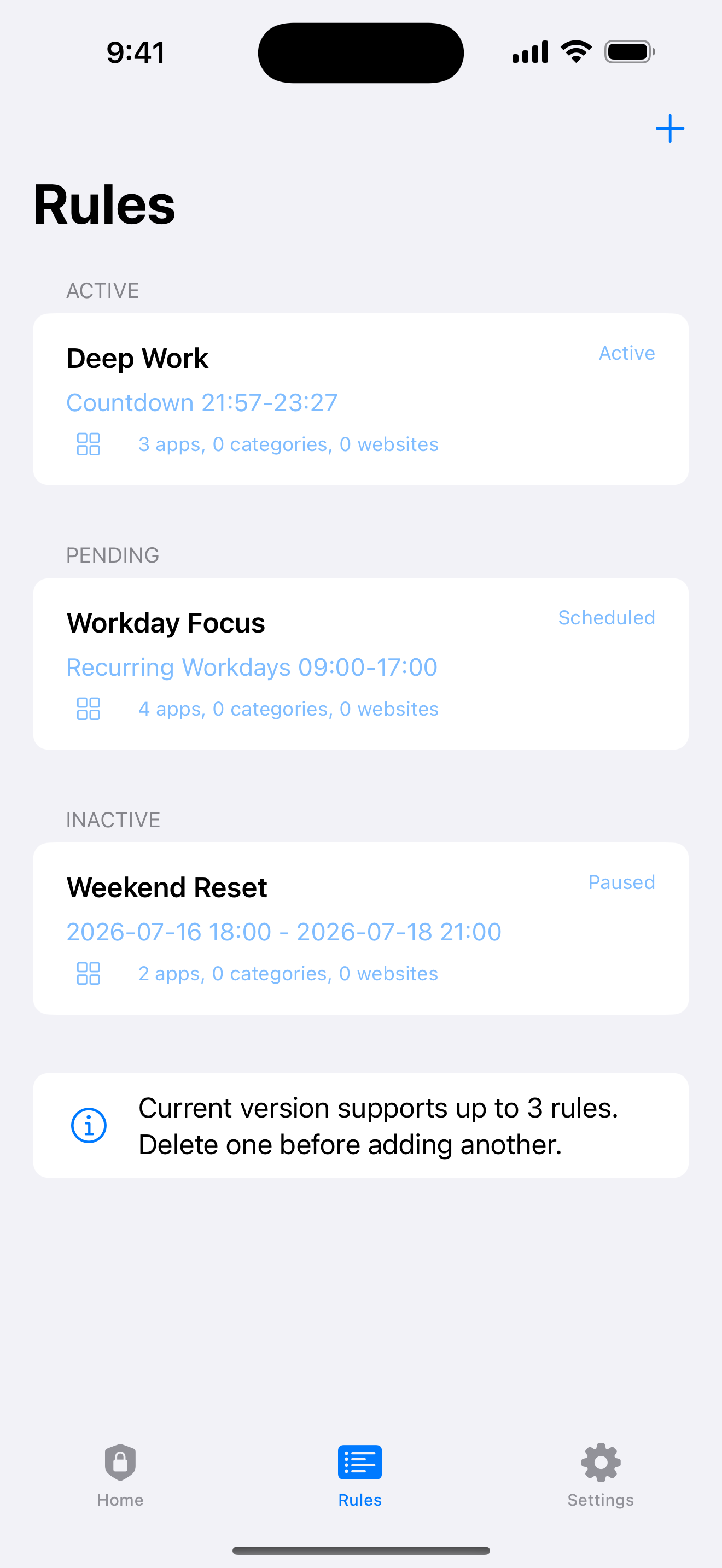
Check whether the rule types match your routine: a short pause now, a custom Countdown, a recurring window, or a Date Range. The useful comparison is the boundary you can set and understand, not a promise that more settings automatically create better habits.
Read the free-trial details carefully
Before installing, look for the exact trial and billing language in Apple's purchase sheet and the developer's terms. Confirm what happens at the end of the trial, what the core app can do before any payment, and whether the support page explains the current launch state. Avoid making a decision from a banner alone.
Also check the cancellation and restore flow that Apple presents. A trustworthy product makes the boundary between its core behavior and any optional tip or purchase understandable without implying that a payment changes the iOS permission model.
Compare limits, modes, and recovery
Count the rules you can maintain without confusion and inspect how the app handles an end, a revoked permission, and a necessary edit. Enough for Now has Quick Lock for 30 minutes, 1 hour, 2 hours, or Tomorrow AM, plus Countdown, Recurring, and Date Range, with three total rules.
Protection should be equally explicit. Eligible recurring-rule edits can use 1, 7, or 30 days, and optional uninstall protection uses the same choices. These periods add friction with a known end; iOS and the device owner remain the recovery authority.
Check account, backend, and analytics boundaries
A local-first workflow may be enough for an app blocker. Ask whether you need an account, a backend connection, ads, or third-party analytics for the core shield to work. Then read the App Privacy Details disclosure and the product privacy page instead of assuming that a small interface has no data practices.
Enough for Now does not require an account or backend for its local rules, and tips unlock nothing. It is still subject to Apple's Screen Time and Family Controls permission model, so the absence of a server does not remove the need to approve the selected apps.
Check support and public availability
Support quality is part of the product. Look for a maintained support page, clear launch notes, honest iOS requirements, and an explanation of what happens when permission is revoked. A short public page with current limits is more useful than a vague promise that every problem has a hidden fix.
Is the public listing live? Yes. Enough for Now is available on the App Store, while the launch page and support site explain the product's current limits and permission boundaries.
Enough for Now
Make distracting apps harder to open on your schedule.
Enough for Now keeps temporary and scheduled app-blocking rules on your iPhone. Quick Lock covers a short pause, while Countdown, Recurring, and Date Range handle defined windows without deleting the apps. Support and launch notes are included in the references below.
FAQ
Does Enough for Now have a subscription?
No. There is no subscription. The product's core boundary is the local rule workflow, and tips unlock nothing.
Do tips unlock anything?
No. Tips unlock nothing; they do not change rule limits, permissions, or the app-blocking workflow.
How many rules should I expect?
Enough for Now currently supports three total rules. Compare that limit with the small set of routines you genuinely need.
Is the public listing live?
Yes. Enough for Now is available on the App Store for iPhone running iOS 17 or later.